bun install -g manta-it
mt init
mt create "My first issue" --priority p1
mt view
Why Manta?
Terminal-native
Create, update, and browse issues without leaving your shell.
See all commands →Lives in your repo
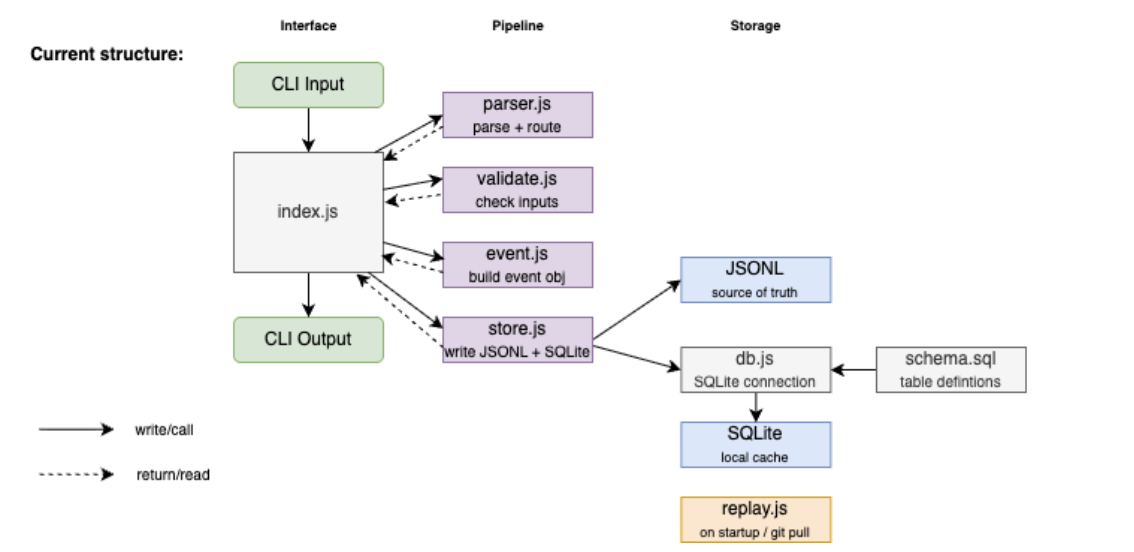
JSONL event log + SQLite cache under .manta/.
Git-friendly sync
Push and pull issues like code. Every command refreshes your cache automatically.
Sync command →Agent-ready
Point AI tools at manta-xxxx IDs in structured local
files.
Documentation
Getting started
Install Bun, link the CLI, run your first commands.
Read guide →All commands
Full cheat sheet for every mt subcommand.
Fields & flags
Priorities, statuses, view filters, and auto-assigned fields.
Open reference →
For contributors:
Architecture decisions and ADRs are in the
GitHub repo.